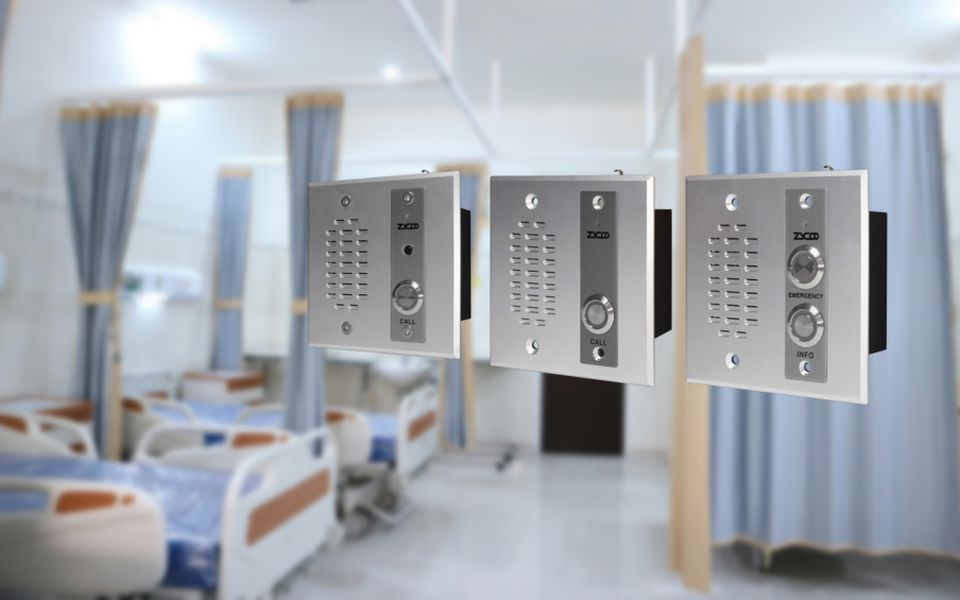
An intercom system is a dedicated communication setup that lets people talk between different points in a building or between separate buildings without routing the call through the public telephone network. In commercial and industrial settings, that usually means a fixed unit at an entry point calling through to a reception desk, security post, or staff phone.
The system exists to solve a specific problem: verifying who's at a door or gate and getting the right person to respond, without anyone walking over to check in person. That's different from a standard phone system, which connects any two extensions on a network but has no fixed physical entry point tied to it. In a modern IP-based deployment, the intercom station sits on the same network as the building's phones and paging equipment, registered as a SIP endpoint rather than wired to its own dedicated box.
Core Components of an Intercom System
Every intercom setup, regardless of connectivity type, breaks down into the same handful of parts.
Door or Entry Station
The entry station is the outdoor or public-facing half of the system. It usually has a call button, a microphone, a small speaker, and, on video-capable models, a camera. This is the piece visitors actually interact with, so it needs to hold up to weather and the occasional impact. ZYCOO's VI Series intercoms, for example, use a vandal-proof aluminum alloy front panel and include tamper detection that triggers an alert if someone tries to force the unit off the wall.
Indoor Station
On the other side is the indoor station, the piece that lets staff answer the call. Depending on the deployment, that might be a wall-mounted monitor, a desk console, a handset, or increasingly, just a software client running on a desk phone or a dispatcher's PC. The point is the same either way: someone inside gets notified, sees or hears who's calling, and decides whether to talk, forward the call, or release the door.
Control Unit or Server
Once a system grows beyond one door and one desk, a platform is required to manage call routing, keep a directory of extensions, and handle device provisioning. In an IP deployment, that's usually a software platform rather than a physical box. ZYCOO's IP Audio Center handles this role for its intercom line, registering each entry station as a SIP device and routing calls to the right extension or paging zone depending on how the system's configured. This is also the layer that ties an intercom deployment into a building's IP-PBX.
Power Supply and Access Control Interface
Every station in the system needs power, and in an IP deployment, that's typically delivered over the same Ethernet cable carrying data, through PoE. Where the intercom controls a locked door, an access control interface, usually an electric strike or magnetic lock, gets wired into the entry station or its control unit so an authorized person can release it remotely. Some devices support DTMF-based door release during an active call, letting the indoor party can unlock a door by pressing a key on their phone.

Types of Intercom Systems
Intercom systems generally split into three categories, based on how the signal actually gets from the entry point to the person answering.
Wired / Analog Intercom Systems
This runs dedicated copper wiring between the entry station and the indoor unit. It's reliable and immune to network or Wi-Fi interference, since it isn't carrying anything else. However, running new wiring gets expensive fast, especially in an existing building or across separate structures. Once set up, the device locations are fixed, not flexible enough.
The wired analog systems still show up in smaller or budget-constrained installs where one door needs to talk to one desk and nothing more.
Wireless / RF Intercom Systems
Wireless intercoms use Wi-Fi or a dedicated radio frequency instead of wiring to send signals, which makes installation faster, particularly for retrofits. The trade-off is signal reliability. Thick walls, distance, and RF interference from other equipment can all affect call quality, and most wireless systems don't scale cleanly past a handful of stations.
IP and SIP-Based Intercoms
IP intercoms run over the building's existing Ethernet or LAN, which means each station is really just a network device, no different in principle from a desk phone or a network speaker. Registered as SIP endpoints, the IP intercoms integrate directly with VoIP phone systems, mobile apps, and centralized management software instead of needing their own parallel infrastructure. However, it needs a stable network.
This is the category ZYCOO's VI Series IP intercoms and IP Audio Center are built around, and it fits larger commercial or industrial sites, multi-building campuses, or any deployment where IT already manages the network and would rather not run a second, separate system just for door calls. For a closer look at how this plays out in practice, see our guide to SIP network intercom for commercial buildings or the VI Series intercom page.

Intercom vs. Paging Systems
An intercom and a paging system get confused often, but they're built for different jobs. An intercom carries two-way and point-to-point communication, with one visitor at one entry station reaching one specific person. A paging system is one-way and zone-based, with an announcement playing across a hallway, a floor, or an entire building, with no way for the receiving end to respond.
That distinction matters for how each gets used in an emergency: an intercom confirms who's on the other end before granting access, while a paging system is built to get a message out fast, not to verify anyone. Some platforms, including ZYCOO's IP Audio Center, run both from shared infrastructure, but the two stay functionally distinct. For the fuller comparison, see our breakdown of the difference between paging and intercom.
How an Intercom System Works
Regardless of connectivity type, an intercom call generally follows the same four-step sequence.
- Signal initiation. A visitor presses the call button on the intercom at the entry station. Then, the microphone picks up your voice, and the sound turns into a digital signal instantly.
- Signal transmission. The signal travels to the destination device over copper wiring, Wi-Fi, or the IP network, depending on the intercom system type.
- Two-way audio or video exchange. The indoor station rings, and once answered, both sides can talk in full duplex. On video-capable units, the indoor party also sees a live camera feed before deciding how to respond.
- Access release, where applicable. If the visitor is cleared to enter, the occupant triggers the door release, and the system sends a signal to the electric strike or magnetic lock to open it.
Where Intercom Fits in a Unified Communications Deployment
An intercom isn't just a security accessory or a piece of access control hardware. That framing misses what's actually happening in a modern IP deployment. When an intercom station registers as a SIP endpoint, it becomes one more device on the same call routing infrastructure as the building's desk phones, mobile clients, and paging zones.
That distinction matters for how a system gets planned and expanded. An IT manager evaluating an intercom for a new site is deciding how that door station will interact with the existing IP-PBX, how calls should route when the front desk is unattended, and whether the same call should also be able to trigger a paging zone or forward to a mobile phone. ZYCOO builds its intercom line around that model, treating each station as one node alongside SIP paging and IP-PBX call routing rather than as an isolated add-on. That's the difference between deploying a set of door stations and deploying one more endpoint on a UC platform they already manage.
Intercom Systems by Use Case
How an intercom gets deployed varies quite a bit by facility type. The priorities around video, access control, and call routing change with the environment.
Intercom System for Schools
Controlled entry is the baseline: a visitor buzzes in, staff verifies who's there before unlocking the door, and the same system often doubles as the channel for lockdown communication during an incident.
Intercom System for Hospitals
Isolation wards and restricted areas need visual verification, not just voice. Video intercom lets staff confirm who's requesting entry before opening a door that controls infection risk or patient safety.
Intercom System for Commercial Buildings
Lobby and loading-dock access are the two most common entry points, usually tied into a broader access control system so the same credential that opens a turnstile also clears a delivery through the dock door.
Industrial and Outdoor Sites
Perimeter gates and warehouse entrances need weather-resistant intercoms that hold up to weather and surrounding noise, with call routing designed for sites where the front desk isn't staffed around the clock.
An intercom system is widely used across various sectors, including schools, hospitals, factories, prisons, parking lots, and transportation hubs, where efficient and secure two-way talkback and confirmation are required. Understanding the intercom system types and how the system works helps implement the most effective solutions tailored to their specific needs.
FAQs
What does an intercom system do?
It lets someone at an entry point, or another area of a building, communicate directly with a specific person or station, and in many commercial deployments, request a door release remotely.
Is a wired or wireless intercom better?
It depends on what the install needs. Wired and IP-based systems generally offer more reliable connections since they're less exposed to interference, and PoE-based IP systems add centralized management and easier scaling. Wireless works better for quick retrofits where running cable isn't practical, though it usually can't scale to as many stations before performance starts to suffer.
Can one platform handle both paging and intercom?
Yes, on IP-based systems, the two often share infrastructure. ZYCOO's IP Audio Center supports SIP paging and SIP intercom from the same server, so a single platform can broadcast zone announcements and handle two-way door communication without separate hardware for each.