You've finished the deployment. The IP Audio Center is up, speakers are registered across zones, and the network is stable. At this point, most projects shift focus from infrastructure to operations — and that's where a different question surfaces: how does the person actually running this system manage it day to day?
Who initiates the live page? Who adjusts the background music schedule when class times changes? Who triggers the emergency broadcast when no one is at the main console? These aren't edge cases. They're the daily realities of operating an IP PA system across a real facility, and they'are exactly what the IP Audio Dispatch Console and IP Audio Dispatch App are built to handle.
This post is written specifically to teams with ZYCOO's IP PA projects, either deployed or in final evaluation, and want to understand how the operator control layer fits in before handover.
The Operator Layer: What the IP Audio Dispatch Console Does
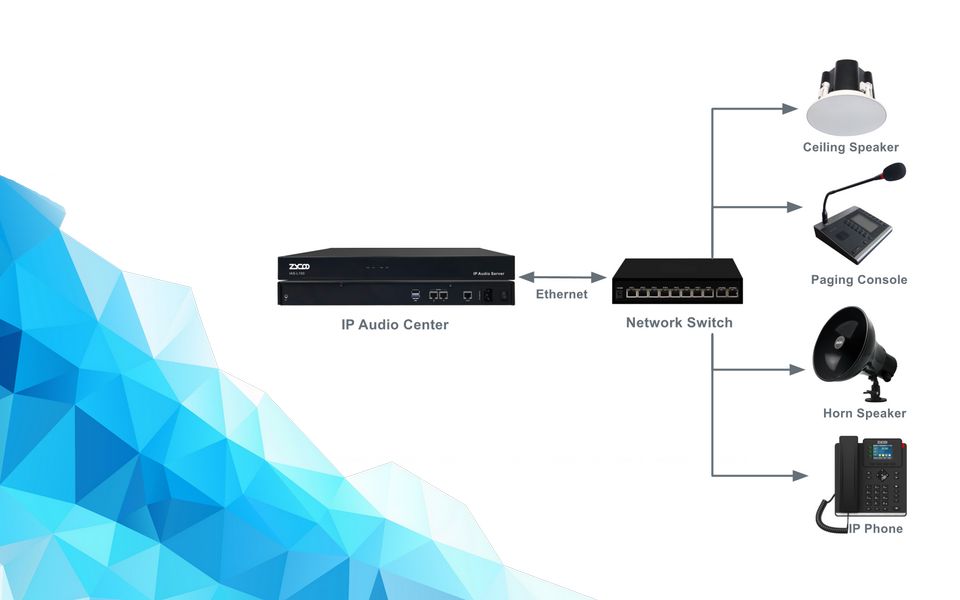
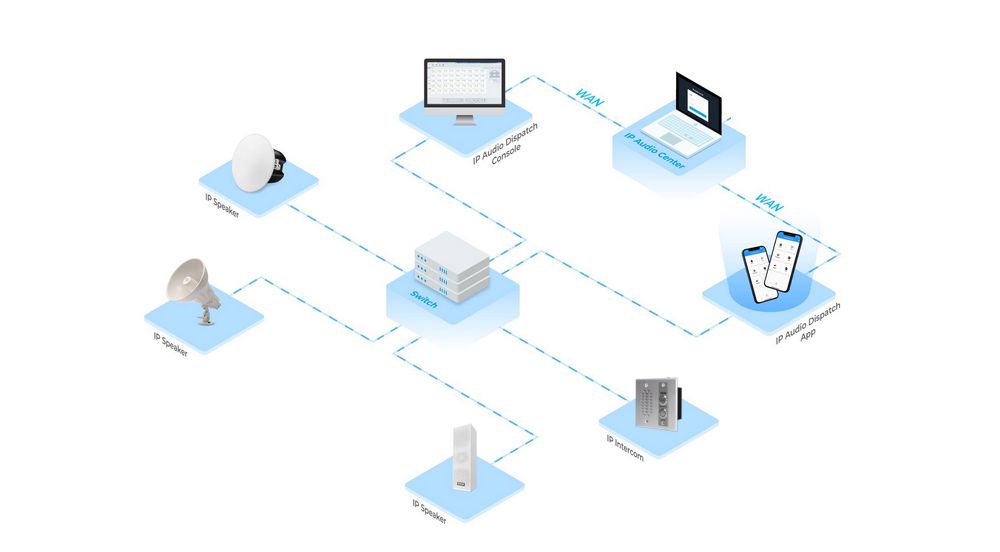
There's a distinction worth making clearly before anything else. The IP Audio Center is where the system administrator works—setting up device accounts, defining paging groups, configuring task logic, and managing user permissions. It's the backend of the system. The IP Audio Dispatch Console is where the operator works—the person responsible for daily paging, scheduled announcements, emergency response, and endpoint monitoring. Two different roles, two different interfaces, one shared system.
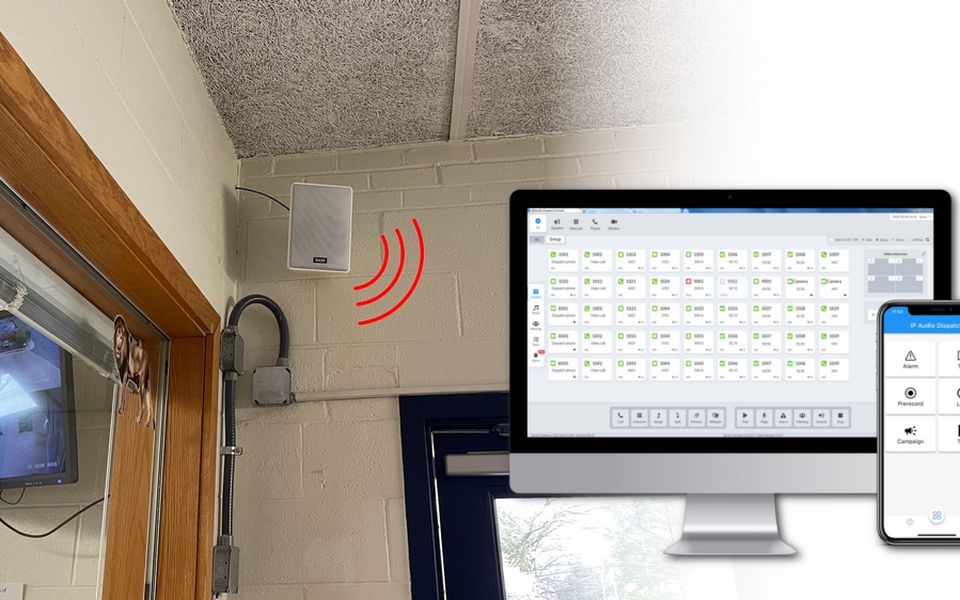
The Console runs on Windows, macOS, and Linux. The IP Audio Dispatch App is the mobile version of that same access, available for iOS and Android. Both connect to the ZYCOO IP Audio Center with the same credentials.
The Console and App are purpose-built for ZYCOO's IP Audio Solutions. For existing ZYCOO deployments, the setup is immediate with no additional infrastructure or integration work. The system administrator creates a dispatch user account in the IP Audio Center, and the operator is ready to log in.
What Operators Can Do from the Dispatch Console
Take a school running morning assemblies, class bell sequences, and end-of-day announcements across four building zones. The PA operator needs to page a specific block without cutting into the background music elsewhere. The security officer needs to trigger a campus-wide lockdown alert without logging into the backend. The principal needs to check whether speakers in the new annex are online before a scheduled broadcast. The Console handles all three from a single interface, with each operator accessing only the zones and functions they've been assigned.
Daily scheduling is where the Console carries most of the workload. Most of what an IP PA system does is scheduled—class bells, shift changes, and background music rotations. The Console's task system covers this with four types: Immediate tasks fire on demand; Timetable tasks repeat on a defined schedule; Dial-number tasks let any staff member trigger a preset announcement by dialling a SIP extension, without needing Console access; and One-click tasks put frequently used announcements like fire drills or closing time on the operator's screen as a single button.
Emergency response is where the design choice to separate operator and admin access pays off most clearly. Predefined alarm types are configured in advance, so during an incident, the operator picks the target zones, selects the alarm, and broadcasts. The system overrides background music and lower-priority audio automatically. No reconfiguration under pressure. Alarm paging logs are shared between the Console and the App, so both desk-based and mobile operators can review what was triggered, by whom, and when.
Multi-operator access without conflict is something larger sites need and rarely get right without the right tooling. The Console's multi-user login lets multiple dispatch users work simultaneously within their assigned paging groups. A school PA operator and a security officer can both be active at the same time, in different zones, without one overriding the other. Zone isolation is set at the account level by the administrator, so the boundaries are enforced by the system rather than left to coordination between people.
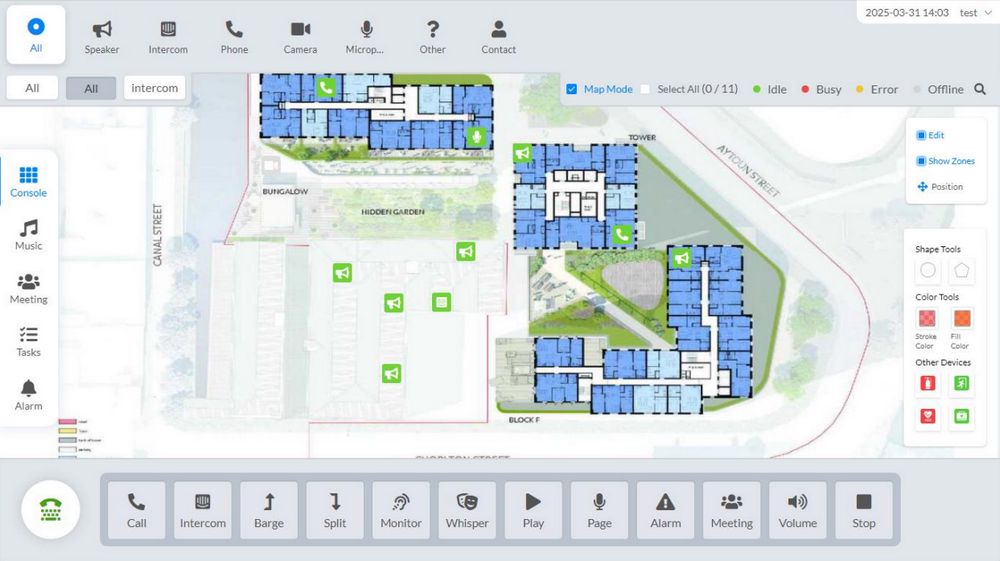
Beyond these, the Console also gives operators real-time endpoint visibility. Device status across all assigned groups, filterable by Idle, Busy, Error, or Offline, and a digital map feature that links device groups to uploaded floor plans. For campuses or multi-floor buildings, navigating by layout is considerably more practical than working through a flat device list. For security-heavy environments, call monitor, call whisper, call barge, and call split are also available for situations where a page isn't enough and active call management is needed.
The IP Audio Dispatch App: For Operators on the Move
A school administrator doing building rounds, a security supervisor moving between entry points, and a facilities manager checking in remotely. They may need to trigger an alarm or verify endpoint status, just not from a desk. The App puts the most time-critical operator functions on a phone, connected to the same IP Audio Center with the same credentials.
For urgent situations, the App supports alarm paging, TTS paging, and pre-recorded message paging. Alarm paging broadcasts a pre-defined alert to selected groups in a few taps. TTS paging converts typed text to speech for immediate delivery, which is useful when the message is specific to the moment, and there's no time to record. Pre-recorded message paging lets the operator record directly on the phone and page it out straight away. Real-time device status and alarm paging logs are accessible too, so mobile operators stay informed without calling the control room.
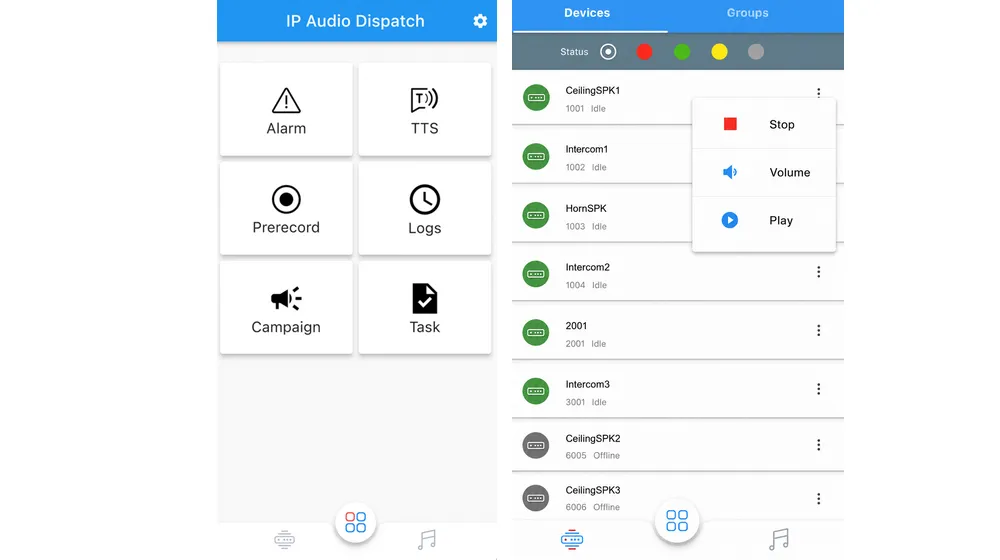
Scheduled task creation, like timetable tasks, dial-number triggers, and one-click configurations, stays in the Console or the IP Audio Center backend. The App is scoped for immediate dispatch in the field, and that boundary is intentional. When both tools are busy, the Console handles the planned side of operations, the App handles the immediate side, and the shared alarm log keeps both views consistent.
Software & Hardware Control: Which Interface Fits Your Site
For multi-zone sites with more than one operator role—schools, hospitals, hotels, and mid-size campuses—the Console is the natural primary control layer, with the App extending access to supervisors or staff who need on-demand control while moving around.
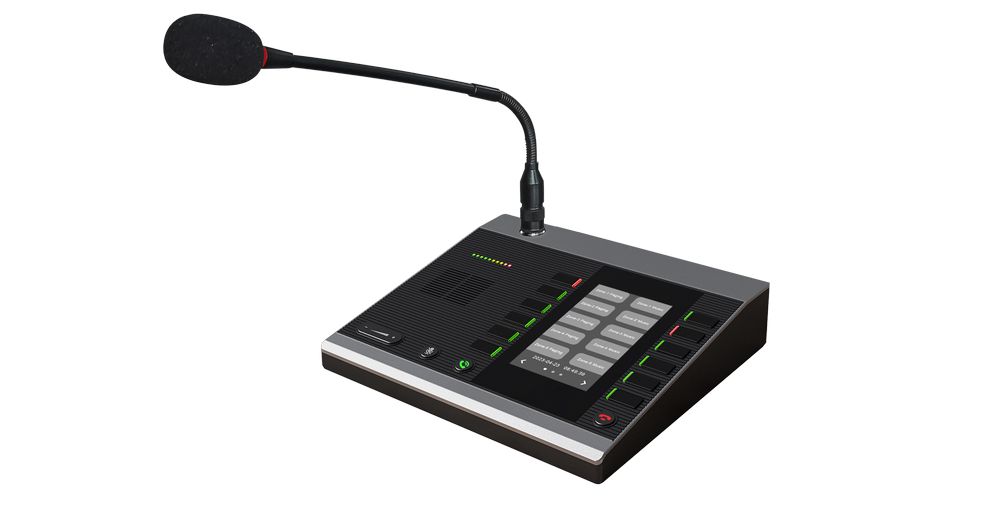
For smaller sites with a single operator at a fixed station, ZYCOO's M100 Network Microphone Console is worth considering alongside the software. The M100 is a hardware dispatch microphone console with 30 programmable keys for direct zone paging; no computer is required. It suits straightforward paging environments where the operator is always at their desk. The M100 and the Dispatch Console work well together in the same deployment: the M100 at the physical station for day-to-day paging and the Console (App) available for scheduled task management or when remote access is needed.
For teams running ZYCOO's CooVox T-series IP PBX alongside an IP PA system, the IP PBX Operator Panel and the IP Audio Dispatch Console serve different functions and can run on the same site without overlap. The Operator Panel handles call control and PBX-side paging. The Dispatch Console handles IP audio endpoints and multi-zone SIP paging within the IP Audio Solution.
Before You Hand Over the System
Getting the operator layer configured properly before handover matters more than it might seem. How paging groups are structured, which task types are assigned to which operators, and how zone isolation is set up will shape how well the system performs in daily use—and how fast operators can respond when something urgent happens.
ZYCOO provides detailed user guides for both the IP Audio Dispatch Console and the IP Audio Dispatch App. Working through the documentation during the IP Audio Center setup is the most reliable way to make sure the operator layer is ready from day one.