When an organization outgrows its legacy PA system or realizes it never really worked well to begin with, the conversation usually turns to IP PA systems with IP speakers. An IP paging setup can run over the same Ethernet infrastructure your phones and computers already use, which simplifies installation, reduces cabling costs, and switches to software-controlled zone management.
This guide covers how IP speakers work in paging and mass notification deployments, what features matter in practice, how the system fits together, and how different industries are using the technology today. Whether you're evaluating your first IP paging deployment or replacing an aging analog system, this should give you a clear foundation to work from.
What Are IP Speakers for Paging?
An IP speaker is a network-connected audio endpoint that receives and plays audio over your IP infrastructure rather than an analog speaker through dedicated speaker wire fed from a centralized amplifier. Each speaker is individually addressable on the network, which means you can target a single room, a floor, a building, or every location in your system from software.
Most IP speakers are SIP-enabled. SIP (Session Initiation Protocol) is the same signaling standard that drives business VoIP phone systems, which means your IP speakers can register directly with your existing IP-PBX or UC platform like a desk phone does. Any authorized user can dial a paging extension and broadcast live audio to a defined group of speakers.
Then, adding a speaker is largely a network provisioning task. If you've already deployed structured cabling and a managed PoE switch, the physical infrastructure is mostly there.
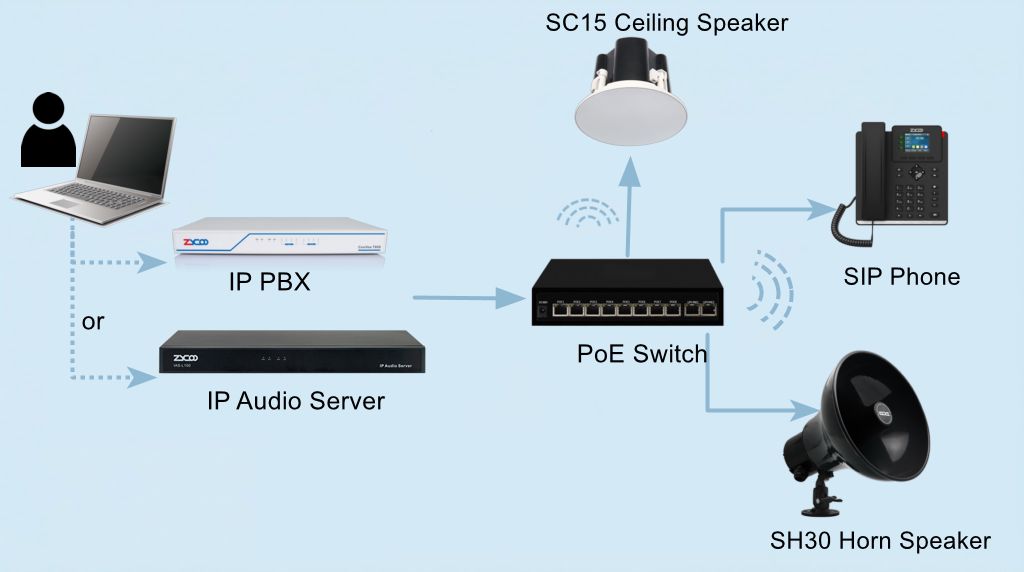
A quick note on the difference between IP and SIP speakers: a basic IP speaker accepts audio streams over the network but may rely on proprietary protocols or a dedicated controller. An SIP speaker registers directly with any standards-compliant SIP server. For business environments where PBX integration and long-term interoperability matter, SIP is the right foundation.
Key Features of IP Speakers for Paging and Mass Notification
Not every IP speaker on the market is suited for every deployment. These are the features worth evaluating seriously before you commit to a platform.
Audio Quality and Coverage
Voice intelligibility is the baseline. For routine announcements in a quiet office, most IP speakers perform adequately. For noisy environments, like manufacturing floors, loading docks, and cafeterias, where ambient noise levels can exceed 80–90 dB, speakers with high SPL output are required, and form factor becoms a real decision.
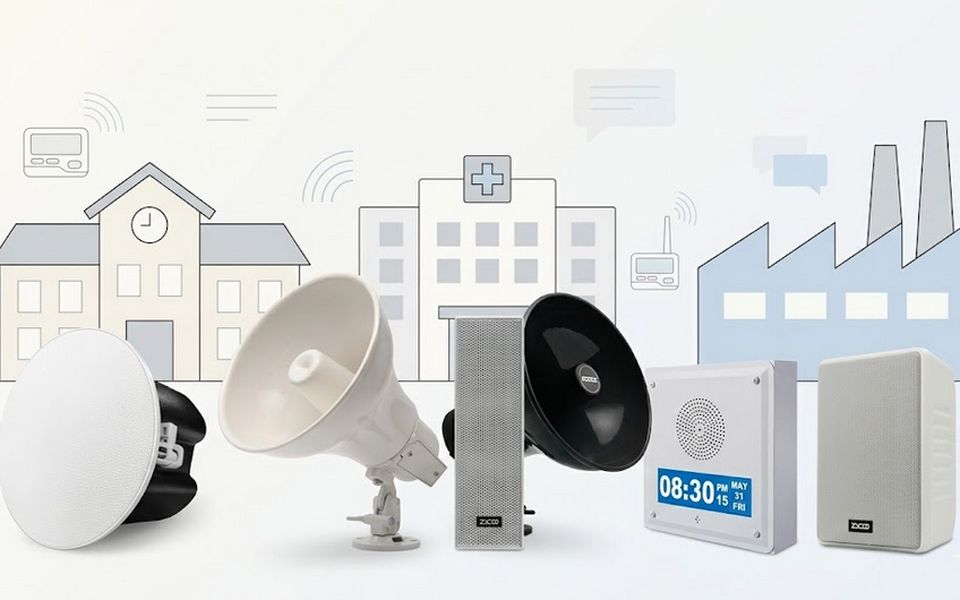
Ceiling speakers work well for enclosed rooms where coverage needs to be even and wide. Horn speakers project sound directionally over longer distances and are the right choice for outdoor areas, and any space where ambient noise is a real factor. Codec choice matters here too—wideband audio (G.722) improves voice clarity compared to narrowband G.711, which makes a practical difference in spaces where HVAC or machinery creates consistent background noise. In a mass notification scenario, that clarity gap between codecs can determine whether an evacuation instruction is understood on the first broadcast or requires repetition.
PoE Support
This is essentially a baseline requirement now. A PoE-powered speaker reduces installation to a single cable run, which cuts both labor cost and the number of in-wall power supply points. Most enterprise-grade IP speakers support IEEE 802.3at (PoE+), which provides up to 30W — enough for higher-output speakers with built-in amplification. Confirm the PoE budget on your switches before finalizing speaker selection, particularly in large deployments.
SIP Compatibility and PBX Integration
SIP compatibility means the speaker can register to virtually any standards-compliant IP-PBX, whether cloud UCaaS platforms, on-premise PBXs, or dedicated IP audio servers. In an SIP-integrated deployment, any authorized user can initiate paging and notification to any defined zone. That workflow is intuitive, requires no additional software for the end user, and works with the existing communication infrastructure.
All of ZYCOO's SIP speakers register natively to standard SIP servers and the ZYCOO IP Audio Center, which provides centralized management for larger deployments. They also support ONVIF, allowing integration into video management systems for synchronized audio-visual response during incidents or emergency events.
Zone Management and Mass Notification Broadcasting
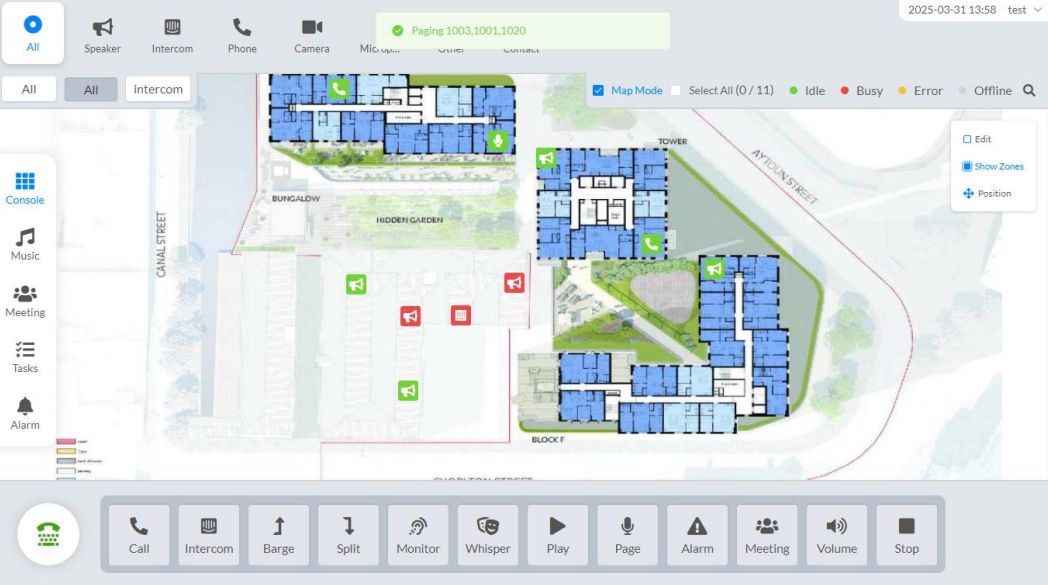
Zone management is where IP paging creates real operational value and where the mass notifcation capability becoms clear. Unlike analog systems, where zones are fixed by physical wiring, IP zones are software-defined. You can reorganize them, create overlapping zones, or adjust them as your facility changes without touching hardware. A mass notification broadcast, whether it's a lockdown, evacuation, or all-call alert, can reach every zone simultaneously or be confined to specific areas with the same single trigger action.
The underlying mechanism is multicast: a single audio stream is sent to a group address and received simultaneously by every subscribed speaker, so network load doesn't multiply as your deployment grows. Whether you're broadcasting a mass notification to 10 speakers or 300, the audio stream itself generates the same network overhead. The ZYCOO IP Audio Center manages zone assignments, broadcast permissions, and scheduled mass notification tasks across the entire speaker network from a single management interface.
Visual Alerts
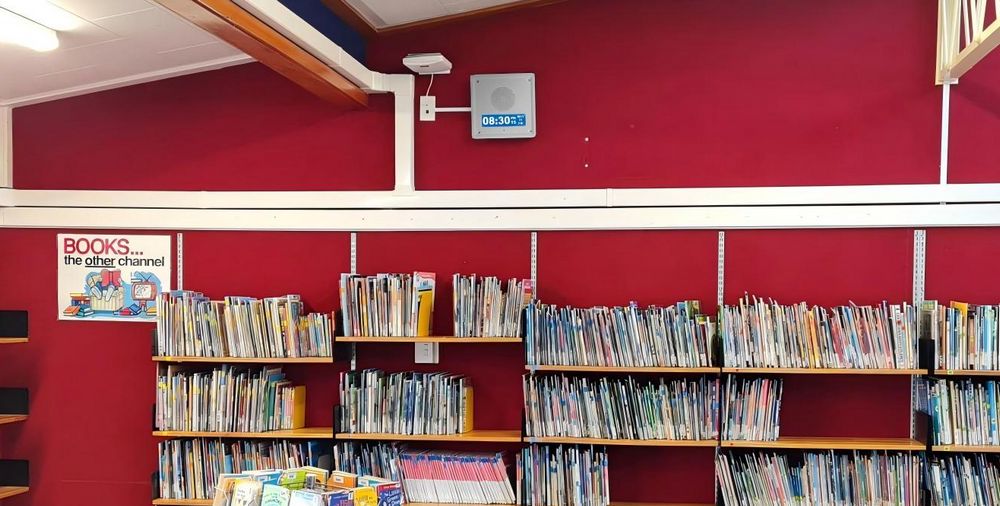
In environments where ambient noise makes audio-only alerts unreliable — manufacturing areas, machinery-heavy spaces, or locations accommodating hearing-impaired personnel — visual alerting becomes important. Some IP speakers integrate LED indicators or strobe outputs. The ZYCOO SQ10-T, for example, combines a wall-mount talkback speaker with an LCD display, supporting both audio paging and visual text notifications from the same endpoint. This type of combined audio-visual device is increasingly relevant in workplace safety contexts.
Use Cases for IP Paging Speakers Across Industries
The flexibility of IP paging is part of what makes it hard to summarize in a single sentence: The same platform that handles shift-change announcements in a warehouse also handles emergency broadcasts in a hospital. Here's how that plays out in practice across the verticals where IP paging sees the most adoption.
Office Buildings and Corporate Campuses
In corporate environments, IP paging typically integrates directly with the existing VoIP phone system. Executives and office managers can initiate announcements from their desk phones without any specialized equipment. The system handles routine communication, like visitor notifications, all-hands alerts, and building-wide announcements—and doubles as a mass notification layer when needed.
ZYCOO's SC10 and SC15 ceiling speakers are ideally suited for such office environments. Ceiling-mounted deployment keeps the workplace clean while delivering even coverage for both paging, notification, and background music. Zone control lets facilities managers segment announcements by floor or department, so a message intended for the third-floor operations team doesn't go building-wide.
Schools and Universities
Educational facilities have some of the most demanding paging requirements. A K-12 campus needs scheduled bell tones, classroom-level PA capability, and a fast, reliable mass notification system that can reach every corner of the campus simultaneously.
Speaker selection follows the acoustic environment: wall-mounted models like SW15 or SQ10-T suit classrooms and corridors for even sound distribution, while the SH series horn loudspeakers handle outdoor areas like playgrounds, where projection distance matters. Within a single paging platform, scheduled announcements and bell schedules run automatically, paging can reach the specific zone, and emergency broadcasts take priority and override any other audio source. ZYCOO's IP audio solutions for schools cover how this maps to the entire campus configuration.
Warehouses and Manufacturing Facilities
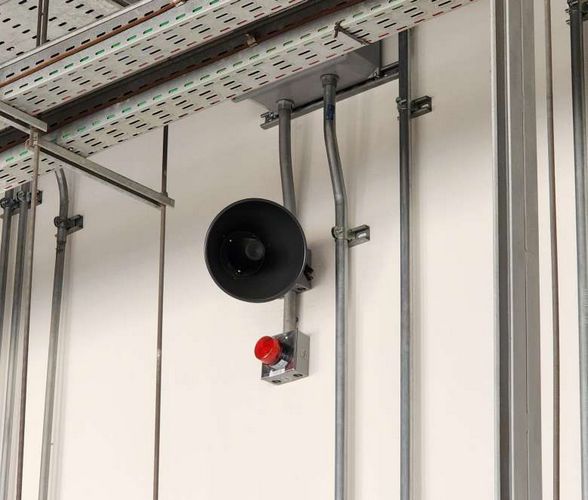
This is the environment where form factor matters most. A standard ceiling speaker isn't going to project clearly across a 50,000 square foot distribution center with 90 dB ambient noise from conveyors and machinery. Horn speakers like the ZYCOO SH10 and SH30 are designed for exactly this context—IP65/66-rated for dust and moisture, and capable of projecting clear audio at the SPL levels these environments demand. Zone control by department or work area means shift supervisors can direct announcements to the relevant team without stopping everyone on the floor. See our IP audio solutions for manufacturing for deployment guidance specific to industrial environments.
Healthcare Facilities
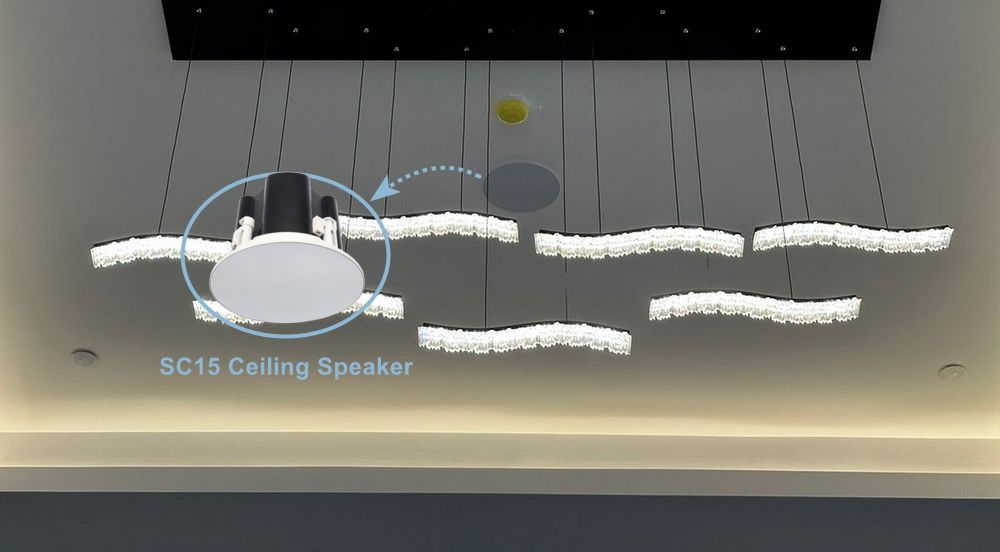
Hospitals and clinics have unique paging requirements shaped by patient privacy, staff workflow, and the need for rapid response during medical events. In these environments, IP paging is usually integrated with nurse station consoles, intercom systems, and zone-based broadcast systems that allow staff to communicate within wards without disturbing other areas. Installing SC15 IP ceiling speakers in the wards ensures even audio distribution across ward areas, supporting both staff paging and ambient audio without the uneven coverage that wall-mounted speakers can produce in large rooms. The integration with the IP Audio Center adds scheduling for routine notifications and one-touch emergency broadcast for codes and critical alerts. Our healthcare IP audio solution page covers the full system configuration.
Retail and Hospitality
Retail environments need both operational communication and customer-facing audio management—in-store announcements, promotional audio, ambient music, and emergency messaging all running through the same infrastructure. Hotels and hospitality venues have similar requirements across lobbies, guest floors, and back-of-house areas. SC15 ceiling speakers suit open retail floors and hotel lobbies, while SW15 cabinet speakers work well in corridors and back-of-house areas where ceiling mounting isn't practical. Zone-level control means a promotional broadcast in the showroom doesn't interrupt a staff page in the stockroom, and a mass notification reaches every zone simultaneously when it needs to.
ZYCOO's retail and hospitality solutions address both the customer-facing and staff-communication layers within a unified platform. More detail is available in our retail and hospitality IP audio solution guides.
Emergency Notification with IP Speakers
Mass notification in an emergency context means getting a clear, authoritative message to every person in the affected area within seconds. IP paging handles this through priority override—a broadcast designated as high-priority interrupts any lower-priority audio currently playing on the affected speakers and takes the channel immediately.
In ZYCOO's IP Audio Center, emergency broadcasts can be pre-configured with designated audio files, triggered from the dispatch console, from a network panic button, or from integration with third-party systems via API or dry-contact input. Speakers receiving an emergency broadcast aren't dependent on an active SIP call — the system can push pre-recorded alerts over the network directly.
Integration with fire alarm panels, access control systems, and sensor inputs is handled at the IP Audio Center level. A dry-contact trigger from a smoke detector or door sensor can automatically initiate a specific pre-recorded broadcast to defined zones without any manual intervention. That kind of automated response is particularly valuable in facilities that operate with skeleton night crews or where seconds of reaction time have physical safety implications.
How to Choose the Right IP Paging Speaker for Your Facility
Getting the hardware selection right means working through a few practical questions before spec shopping.
Acoustic Environment and Form Factor
As covered in the features section above, the environment drives form factor. Ceiling and cabinet speakers suit offices, classrooms, and retail. Horn speakers are right choice for industrial or outdoor. Column speakers cover open exterior spaces. ZYCOO's SIP speaker line covers all three categories, and the right choice is usually obvious once you've walked the space and measured ambient noise levels.
PBX and System Integration
If you're running a SIP-based phone system—whether on-premise or cloud-hosted—ZYCOO speakers register natively as SIP endpoints without additional gateways. If you have a legacy analog PBX and want to preserve it, the X10 Paging Gateway handles the conversion layer.
Zone Requiremnt and Deployment Scale
A small office with one zone is straightforward. A multi-building campus with department-level paging permissions, scheduled content, and emergency override capability needs a management platform behind it. The IP Audio Center scales from a handful of endpoints to large multi-site deployments, and multicast configuration ensures the network stays efficient regardless of how many speakers are in a given zone. For simpler, single-site deployments, the M100 Microphone Console handles up to 30 zones in a serverless configuration.
Scheduled and Automated Broadcasting
Routine announcements like shift bells, class schedules, and recurring safety reminders can be configured in the IP Audio Center's scheduling module and run without operator intervention. This is worth confirming as a requirement early, since not all IP paging controllers support flexible scheduling natively.
Mixed Analog & IP Environments
Many facilities don't need to replace everything on day one. ZYCOO's X10 paging gateway is specifically designed for hybrid deployments, letting you extend an existing analog PA system with IP capabilities while migrating at whatever pace the project allows.
If you'd like to discuss specific deployment requirements, ZYCOO's team can help map out a configuration that fits your infrastructure and scale.
FAQs
Q1. Do IP paging speakers work with any SIP phone system?
In most cases, yes. ZYCOO speakers are built on standard SIP (RFC 3261) and can register with any compliant SIP server. Interoperability with common platforms is well established. If you're running a proprietary or hosted UC platform, it's worth verifying SIP endpoint support before specifying hardware.
Q2. How many speakers can one system manage?
The IP Audio Center scales to support large multi-site deployments. The exact endpoint ceiling depends on server specifications, but the architecture is designed for enterprise scale, not just branch office environments.
Q3. Can IP speakers play background music in addition to paging?
Yes. ZYCOO speakers support streaming media for background music playback alongside SIP paging functionality. The two operate on separate channels and can be configured to coexist without conflict.
Ready to Move Beyond Analog?
If you're evaluating IP paging for a new installation or planning to modernize an existing PA system, the technology decisions come down to a handful of practical variables—form factor, integration requirements, zone complexity, and whether you need emergency broadcast capability built in from the start. ZYCOO's IP audio line is designed to cover that full range, from a simple SIP ceiling speaker in a single-office deployment to a multi-site mass notification architecture managed through the IP Audio Center.
Reach out to ZYCOO to talk through your requirements, or explore the full IP speaker lineup to get a feel for what's available before we connect.