A school rarely functions as a single building. Campuses grow. Classrooms change purpose. Outdoor areas become part of daily activity. Communication needs shift with every new term.
At the same time, expectations around school communication have changed. Daily broadcasts need to be clear and well-timed. Emergency messages must reach the right areas instantly. Administrators want more control. That's why many projects now look at an IP PA system for school environments. Instead of relying on fixed wiring and a single control point, IP PA allows communication to run over the campus network and adapts as the campus evolves.
Designing that system, however, takes more than replacing analog speakers with IP devices. It requires understanding how schools operate day to day and thinking about control, zoning, user permissions, and long-term operation.
Why Traditional PA Systems Fail Multi-Building Campuses
Traditional PA systems were engineered around centralized amplifiers and hardwired speaker circuits. That architecture worked for single-building environments. However, multi-building campuses with separate classroom blocks, outdoor areas, sports facilities, and administrative wings expose the limits quickly.
Some messages should reach everyone, while others should stay within a specific building or zone. In analog systems, zones are tied to wiring. When a building is expanded or repurposed, modifying zones usually means dealing with physical cable paths. The system continues to operate, but it no longer mirrors how the campus actually functions.
Control creates another challenge. A single PA console in the main office assumes communication flows through one location. However, security staff, administrators, and event coordinators may all need controlled access. In analog setups, there is no concept of granular user roles — access is either fully open or fully restricted by who holds the key to the PA console.
Emergency communication exposes these weaknesses further. Lockdowns and evacuations require priority override and precise zone targeting. Analog setups can support emergency broadcasts, but often rely on manual steps and fixed hardware. Monitoring is also limited. Faulty speakers or disconnected lines may not be detected until an announcement fails.
As campuses grow and schedules become more complex, fixed PA structures start to feel restrictive. That gap is what drives many school projects toward IP-based public address systems.
Core Components of a School IP PA System
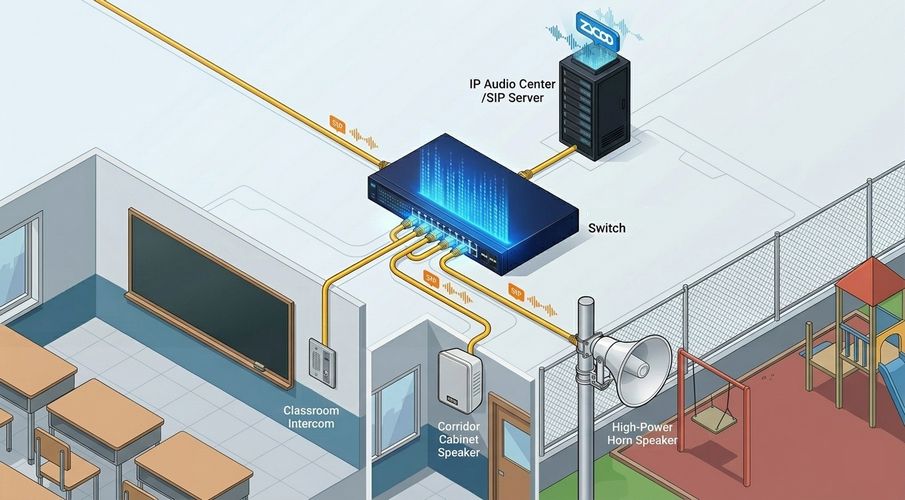
A well-designed IP PA system for school projects follows a clear structure: centralized management, shared IP infrastructure, and distributed SIP-based endpoints.
Central Control and Dispatch
At the core of any school IP PA system sits the management platform—an IP audio server combined with a software dispatch interface. This layer handles announcement scheduling, priority logic, zone routing, and user role management.
Unlike traditional systems, where all control flows through a single physical console, IP-based management allows different staff to access the system simultaneously with defined permissions. Bell schedules, routine announcements, and emergency triggers can all be pre-configured in software and executed without requiring someone at a fixed hardware station.
ZYCOO's IP Audio Center fills this role in campus deployments, pairing server-side scheduling with a dispatch console software that supports zone selection, live paging, and emergency trigger control from any authorized device on the network.
Network Layer and Infrastructure
The IP network carries audio traffic alongside data and voice. In school environments, this usually means managed switches, network planning, and PoE support.
IP speakers can connect directly to the network. They receive multicast or unicast audio streams and play them locally. Powered by PoE, the installation becomes cleaner, especially in renovation projects. For schools with mixed infrastructure — newer buildings with managed switches alongside older blocks with legacy wiring — SIP paging gateways can bridge the gap, integrating analog speaker circuits into the IP-managed system without a full rip-and-replace.
Audio traffic requires stable handling. Proper network configuration ensures that announcements remain clear even during peak data usage. When planned correctly, the PA system integrates smoothly with the campus IT structure instead of operating as a separate subsystem.
Distributed IP Endpoints
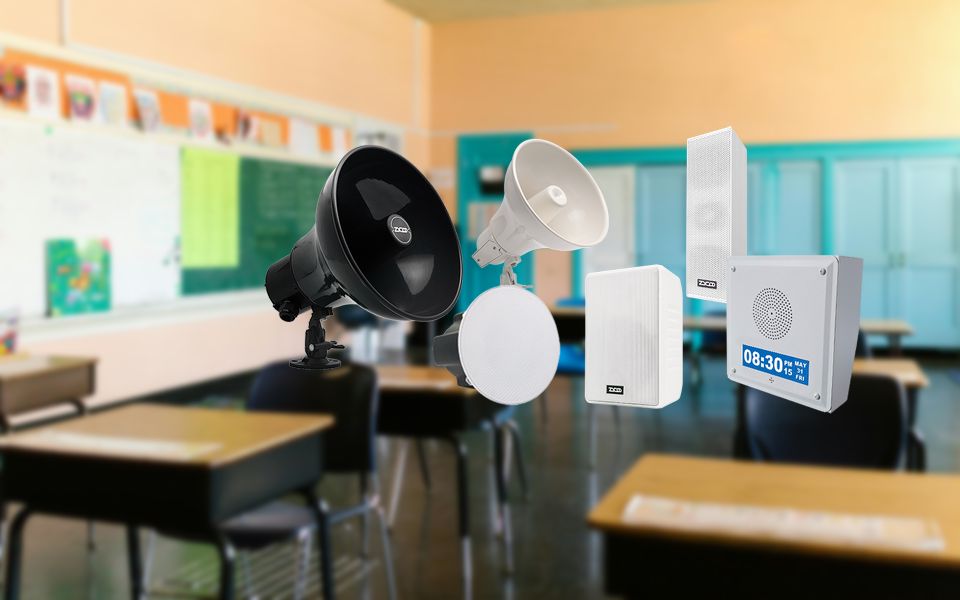
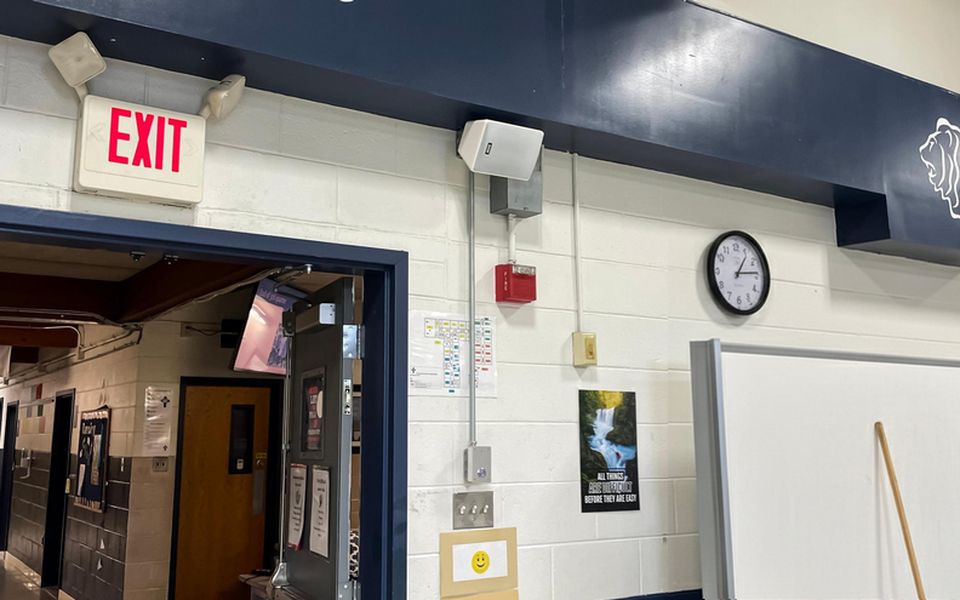
Different campus areas require different endpoint types. Ceiling-mounted IP speakers suit classrooms and corridors where balanced coverage at controlled volume is the priority. Wall-mounted speakers work for areas needing wider dispersion. Outdoor zones — sports fields, playgrounds, and building perimeters — require IP horn speakers with higher SPL output and weather-resistant enclosures. Two-way intercoms complete the endpoint layer, enabling staff-to-office communication that the one-directional PA layer cannot handle.
ZYCOO's SIP speaker range covers all four of these endpoint types, allowing a single system architecture to serve the full campus without device-category gaps.
Zone Architecture: Campus-Wide, Building-Level, and Functional Layers
Zone design determines how flexible the system feels in daily use.A practical school layout usually follows three layers: campus-wide zones, building zones, and functional zones.
- At the campus level, zones may cover entire sites or large outdoor areas. These zones are useful for broad announcements or emergencies that affect everyone.
- At the building level, zones follow physical structures such as classroom blocks, administrative buildings, or sports facilities, allowing messages to reach specific parts of the campus without disrupting others.
- The functional layer adds another dimension. Not all spaces within a building serve the same purpose. Classrooms, corridors, cafeterias, and outdoor fields behave differently from an audio perspective and from an operational one. Classrooms usually require clear but controlled volume. Corridors need wider dispersion. Playgrounds and sports fields demand higher output and weather-resistant equipment.
In an IP PA system, zoning is defined in software. A classroom can belong to multiple groups at the same time. It might be part of a building zone, a grade-level zone, and an emergency group. When spaces are reassigned or expanded, changes happen through configuration instead of rewiring.
Practical Zone Scoping Guidance
A campus-wide zone should include all outdoor areas, corridors, and common spaces by default — these are the endpoints that need to receive every broadcast.
Building zones should follow emergency isolation logic: in a lockdown scenario, staff need to address Building A independently of Building B. Zone boundaries should mirror your incident response plan, not just your floor plan.
Functional zones within classrooms require attention to ambient noise. HVAC systems, playground proximity, and cafeteria adjacency all affect how much acoustic headroom announcements need to overcome background noise. SPL headroom planning at the zone level — not just device selection — determines whether announcements are actually heard.
This structure allows more precise communication. Instead of interrupting the entire campus, messages can reach only the relevant audience.
Daily Broadcasting, Scheduled Paging, and Emergency Override
In a modern school environment, daily broadcasting, paging, and emergency communication share the same infrastructure. The system has to handle them without confusion.
Daily broadcasting in an IP PA system is often scheduled in advance. Class change signals, lunch reminders, or routine messages can be automated through the central control platform. Using an IP audio server such as those in the ZYCOO portfolio, schedules can be adjusted without touching physical hardware, making it easier to align communication with changing timetables.
Paging plays a more focused role in schools. It's typically used for short, targeted announcements. Through the IP Audio Dispatch Console or compatible SIP devices, authorized staff can select specific zones and initiate announcements.
Emergency communication raises different requirements. During a lockdown or evacuation, messages must override all scheduled playback and reach the correct zones without delay. A school IP PA system needs built-in priority logic that ensures emergency audio takes precedence automatically without manual steps.
Pre-defined emergency messages aligned to s
 pecific scenarios allow authorized staff to trigger prepared alerts immediately, reducing hesitation when speed matters. How the PA system integrates with intercom, panic buttons, and access control to form a coordinated emergency response layer is a separate design question; see School Emergency Communication Systems for a full treatment of multi-system emergency architecture.
IP Audio Center as the Campus Management Layer
System architecture decisions become concrete when you look at how the management layer actually operates on a real campus. ZYCOO's IP Audio Center is the platform used in school IP PA deployments to centralize scheduling, zone management, priority logic, and device monitoring.
In a typical K-12 deployment, IP Audio Center manages:
- Bell schedules and daily announcements — configured once, executed automatically. Schedule adjustments are in the software.
- Zone routing and multi-group logic — a classroom can belong to multiple zones simultaneously (building zone, grade-level zone, emergency zone) and receive only the broadcasts relevant to its current assignment.
- User roles and permission tiers — administrators, security staff, and front-office personnel each operate within defined access levels. Emergency trigger authority is restricted to authorized personnel only.
- Device health monitoring — IP Audio Center provides real-time visibility into endpoint status. A disconnected speaker or failed network port is flagged before it causes an announcement failure.

This architecture separates management from hardware. When a new building is added, it enters the zone structure through software configuration. When schedules change, no technician visit is required.
This management model is a useful reference point regardless of final product selection — the key questions to ask any platform are whether it supports multi-group zone logic, role-based access, and remote device monitoring. Systems that lack any of these three capabilities will create operational gaps at scale.
Key Planning Factors for School IP PA System Design
Choosing the right IP PA system for school projects involves more than comparing speaker models.
Campus Size and Building Layout
A compact primary school with one main building requires a very different structure than a multi-building campus with sports facilities, dormitories, and outdoor zones. Building layout affects cable routes, network topology, and zone logic. Long corridors, open courtyards, and separated blocks all change how audio should be distributed. Understanding these helps you choose the right device and placement.
Sound and Communication Requirement
Speaker selection in school environments is heavily influenced by ambient noise conditions. HVAC systems, playground activity, cafeteria adjacency, and corridor reverb all affect how much acoustic headroom an announcement needs to be intelligible — not just audible. The relevant metric is Speech Transmission Index (STI): a measure of how well speech survives the acoustic path from speaker to listener. In environments with high background noise or significant reverb, an STI-informed approach to speaker placement and SPL planning is more reliable than selecting devices based on output ratings alone.
Integration with Safety Systems
Modern schools often operate fire alarms, surveillance, and access control platforms. An IP PA system should coexist with these systems—for example, aligning emergency audio with fire triggers. Furthermore, for a truly comprehensive security mesh, the PA system should integrate with the school's IP intercom system, allowing for seamless two-way communication between classrooms and the front office, further ensuring that daily paging and emergency talkback are handled through a single, unified infrastructure. For schools in Alyssa's Law states, the emergency communication layer must inclue a silent panic alarm capability integrated with local law enforcement notification. This requirement affects how the PA system's emergency trigger architecture is designed.
Network Readiness
Audio streams share infrastructure with data and voice traffic, so stable infrastructure, network planning, and PoE capacity must be evaluated carefully. Real-time audio is sensitive to instability. Early coordination between IT and audio planning reduces unexpected performance issues after deployment.
Long-term Operation
Schools need visibility into device status and system health. If a speaker disconnects or a network port fails, administrators should know before it affects daily communication. Designing for maintainability—including remote device monitoring and easy software updates—protects the school's investment over the long term.
When these factors are addressed together, the resulting IP PA system becomes part of the school's operational structure rather than a standalone upgrade.
Conclusion
An IP PA system for school environments brings structure to campus communication. It connects control, network infrastructure, and distributed endpoints into a single, coordinated platform.
When designed carefully, the system adapts as buildings change, schedules shift, and campuses expand. Software-defined zoning and centralized management reduce the limitations tied to fixed wiring and isolated control panel.
ZYCOO's school IP audio solutions span the full system layer — from IP Audio Center as the campus management platform to SIP-based speakers, intercoms, and paging gateways designed for K-12 deployment environments. If you are scoping a new school project or planning an upgrade from an analog system, contact ZYCOO to discuss zone architecture, infrastructure requirements, and deployment planning for your specific campus.