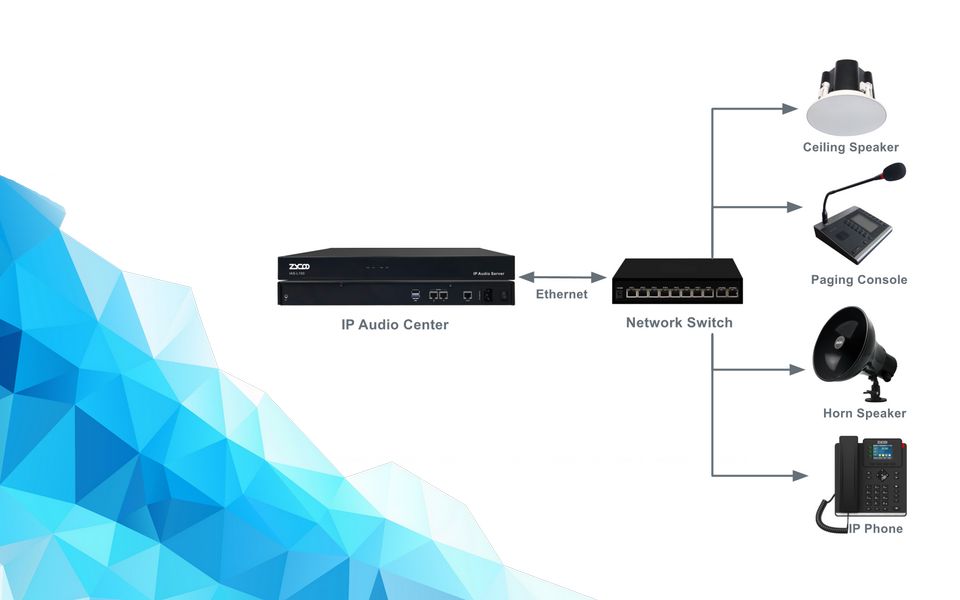
Choosing an appropriate IP PA system is not the same as buying audio equipment. You are deciding how your facility communicates during daily operations, scheduled routines, and critical emergencies. Get it right, and the system runs quietly in the background for years. Get it wrong, and you'll deal with coverage gaps, integration failures, and costly retrofits.
This guide is written for those who already understand what an IP PA system is and are now evaluating options and scoping a deployment. It walks through eight decisions, what the system needs to do, how large the deployment is, what architecture fits, which speakers belong where, whether the network is ready, what else has to connect, who manages it, and how it holds up when something fails, before you commit to any hardware.
Criterion 1: Define What the System Needs to Do
Before touching a spec sheet, answer the following four foundational questions.
1. What is the primary function? Daily announcements, background music, emergency paging, or all three? Systems optimized for scheduled audio playback are designed differently from those built around emergency preemption and fire alarm integration. A facility that needs both routine and life-safety paging in the same platform requires a different level of design investment than one running only shift-change bells.
2. Who initiates announcements, and from where? A receptionist paging from a desk phone has straightforward requirements. A security operator managing facility-wide alerts from a control room introduces different hardware and software needs. Automated triggers, where a VMS event or sensor input triggers a pre-recorded announcement to a defined zone, require API or dry contact integration that needs to be scoped during design.
3. How often will the system configuration change? A static warehouse with fixed zones and a static bell schedule has very different management requirements from a hospital or campus where zones, priorities, and schedules are changed regularly. For dynamic environments, software-defined management handles routine reconfiguration without physical intervention, thus reducing maintenance workload.
4. What happens if the system fails during an emergency? A non-critical deployment where a failed announcement means a delayed shift change only causes inconvenience. A missed evacuation alert in a hospital or manufacturing facility carries real operational or safety consequences. For life-safety paging, the emergency solution needs to drive your architecture decisions from day one, including server redundancy, backup power planning, and whether the platform needs to interface with fire alarm infrastructure.
Criterion 2: Match the Architecture to Your Scale
IP PA systems that work well at 20 speakers in a single building may behave completely differently at 500 speakers across a distributed campus. Scale affects not just hardware quantities but system architecture, network design, and management overhead.
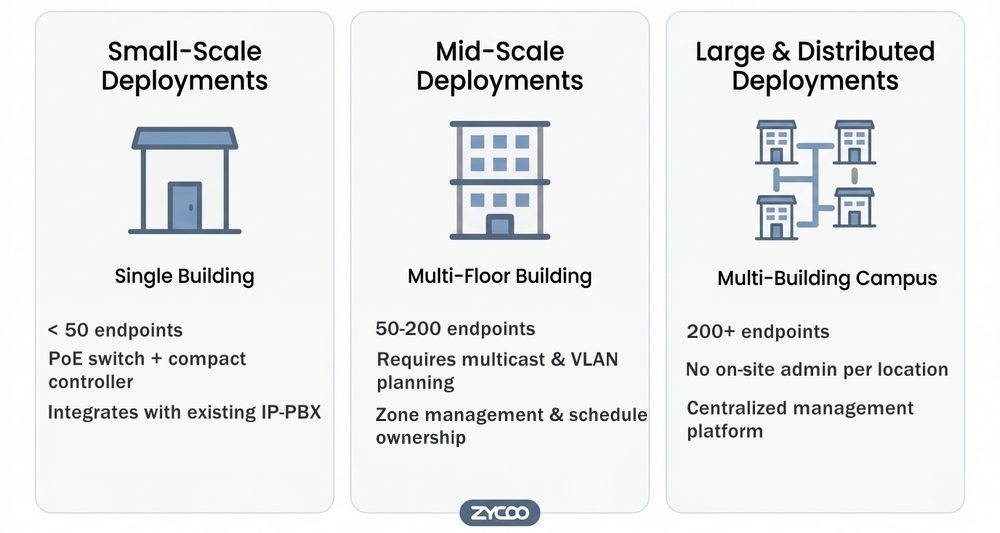
Small-Scale Deployments (Single Building, Under 50 Endpoints)
For a single building with straightforward zoning requirements, IP PA implementation is most forgiving. Standard PoE switches, a compact controller, and web-based zone management are typically sufficient. The focus here should be on choosing a platform that integrates with the existing IP-PBX, so paging can be triggered from standard desk phones or extensions without additional licensing complexity.
ZYCOO's IP Audio Center handles this tier with a compact deployment footprint and a straightforward configuration path.
Mid-Scale Deployments (Multi-Zone, 50–200 Endpoints)
At this scale, multicast configuration becomes important. Without proper multicast support on your network switches, broadcasting to zones simultaneously will create bandwidth problems. VLAN planning is strongly recommended to isolate audio traffic from regular data traffic. You also need to think carefully about who manages the system operationally — zone changes, schedule updates, and device monitoring all need clear ownership.
Large and Distributed Deployments (Multi-Site, 200+ Endpoints)
A multi-building campus or multi-site enterprise needs a centralized management platform to handle distributed paging endpoints without requiring on-site administration at each location. This means evaluating the server architecture, failover capability, and whether the system can realistically be managed from a single interface across geographic distances.
The IP Audio Center is designed to serve as the centralized control layer across these more complex topologies, with device registration, zone logic, and scheduling managed from one platform regardless of physical location.
Criterion 3: Choose Your Deployment Architecture
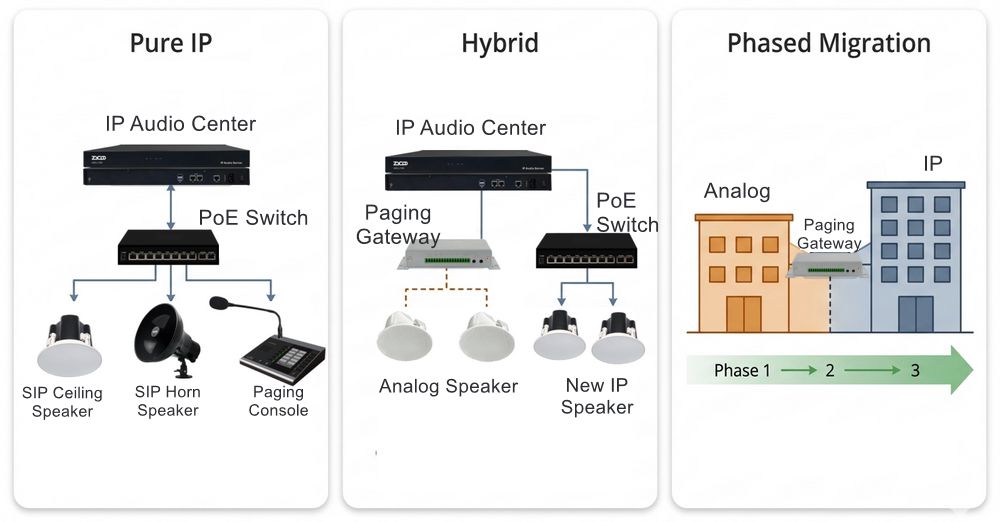
Most real-world IP PA projects don't start from a blank slate. The architecture question is usually about what to keep, what to bridge to IP, and what to replace outright. There are three models worth understanding.
Pure IP
A pure IP deployment suits greenfield installations and facilities where the existing analog infrastructure is at the end of life. SIP network speakers, microphone consoles, network panic buttons, and all endpoints connect over standard Ethernet and draw power via PoE. The IP Audio Center manages everything from a single platform, and zone logic lives entirely in software. It's the cleanest architecture and the most flexible over time, though it requires solid PoE switch infrastructure from the start.
Hybrid
This is probably the most common scenario in practice. Working analog speakers remain in place and connected to the IP network via Network Paging Gateway. The gateway registers as a SIP endpoint on the IP Audio Center, multicasts received audio to the connected analog zones, and those legacy speakers participate in zone paging and emergency broadcasts alongside new IP speakers in expansion areas. For schools with existing systems or factories with installed horn arrays, this approach protects the existing hardware investment while unifying control under a single IP management layer.
Phased Migration
The migration usually works across two to three years and is the ideal model for large facilities with significant analog infrastructure. The first phase deploys the IP Audio Center and paging gateways over the existing analog plant, establishing SIP control and unified zone management. New IP speakers go in where analog coverage is already failing or where expansion is underway. Remaining analog zones migrate floor by floor or building by building as hardware reaches the end of life.
One planning note: configure VLAN tagging for audio traffic in Phase 1. Retrofitting it into a live system later is significantly more disruptive than building it in from the beginning.
Criterion 4: Match Speaker Type to Acoustic Environment
Getting the speaker type wrong for an environment means intelligibility problems that no amount of software configuration can fix. The selection logic must be applied to the environment.
| Environment | Speaker Type | Key Consideration |
|---|---|---|
| Office, healthcare corridor, classroom | IP ceiling or wall-mounted speaker | Speech intelligibility; even 360° coverage |
| Industrial floor, warehouse | IP horn speaker ((high SPL, IP65-rated)) | Directional projection at 85 dB+ ambient noise |
| Outdoor: parking areas, perimeter | All-weather horn or column speaker | IP65+ weatherproofing, UV-resistant housing |
| Large open space: stations, airport concourse | Column speaker | Controlled vertical dispersion, reduced reflections |
Speaker type is only half the equation. Coverage density is the other half, and it's easy to underestimate in a large room.
Start from the ceiling height: measure the distance from speaker to ear level, then use that with the speaker's coverage angle (most ceiling speakers list 90° to 120°) to work out spacing. A 12-foot ceiling-to-ear distance at a 100° angle gives roughly 29 feet of clear coverage per speaker, so an 80 by 100-foot room needs about nine speakers, not two or three spaced far apart. For sound level, the rule of thumb holds across most environments: speaker output should land 10 dB above the ambient background noise, more in a genuinely loud space like a warehouse floor. ZYCOO's guide to SPL in IP audio systems covers this calculation in more depth.
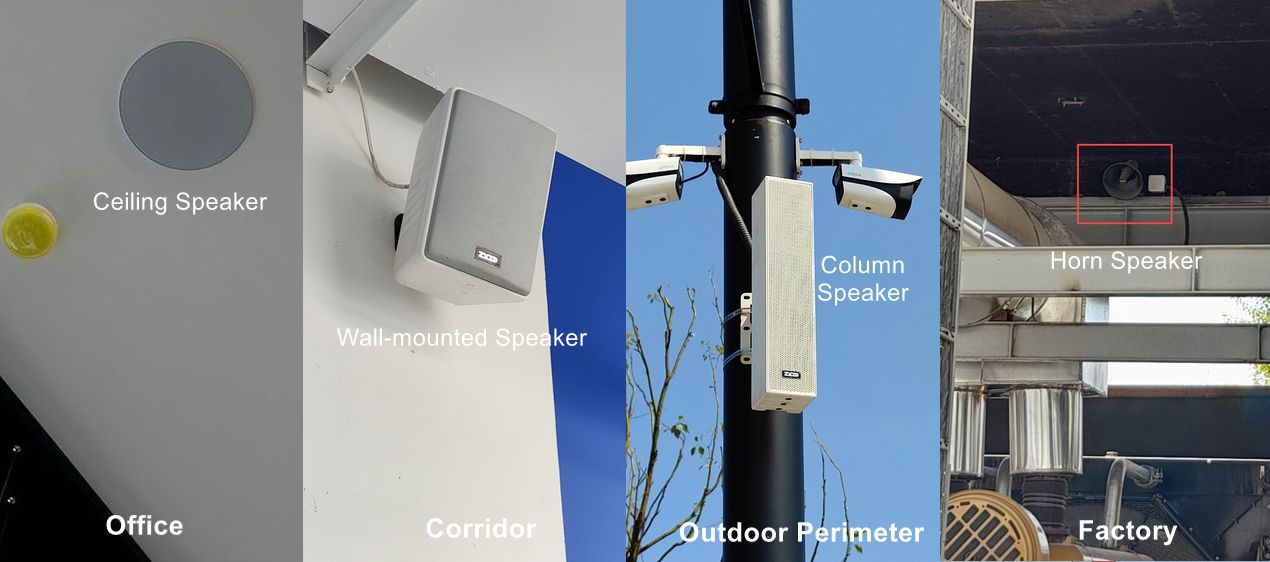
ZYCOO's SIP speaker range covers all of these. The SC15 ceiling speaker and SW15 cabinet speaker handle standard indoor commercial environments, while the SH30 horn speaker is designed for high-ambient-noise industrial and outdoor deployments with an IP65-rated enclosure. Column and all-weather configurations round out the portfolio for transit environments and outdoor zones.
Criterion 5: Validate Network Before Specifying Hardware
IP PA systems depend on the network. A well-configured network makes IP PA reliable; a poorly designed one creates problems no device upgrade will fix. There are five things worth checking before any hardware is ordered.
PoE Power Budgets
Your switches need to support PoE or PoE+ to power IP speakers without a separate power infrastructure. Verify port budgets — a 24-port PoE switch may have a total power budget that limits how many high-wattage speakers can run simultaneously at full load.
Multicast and IGMP Snooping
Facility-wide paging relies on multicast audio streaming to avoid sending duplicate unicast streams to every endpoint. Without IGMP snooping enabled on your switches, multicast traffic floods the entire network, causing significant performance issues.
VLAN segmentation & QoS
Separating audio traffic from general corporate data on a dedicated VLAN improves both stability and security. Pair this with DSCP QoS configuration to prioritize RTP audio traffic over general data, especially in environments where large file transfers, backup jobs, or video conferencing share the same LAN. Audio streams are latency-sensitive in a way that most data traffic isn't, and the network configuration needs to reflect that.
Infrastructure Span
If paging crosses site boundaries over a WAN link, latency above roughly 150 milliseconds will affect synchronized delivery. More importantly, the system should be designed so that site-local zones continue operating normally if the WAN connection goes down.
If your IT team cannot confidently answer these questions today, a network assessment should happen before hardware procurement, not after.
Criterion 6: Map Every Integration Before Committing to a Platform
Integration capability is where IP PA delivers its most compelling value over analog. It's necessary to define whether your IP paging project requires system integration.
IP-PBX Integration
The most common enterprise integration is IP PBX connectivity. When the PA platform registers as a SIP endpoint on the IP-PBX, any desk phone or softphone can dial a zone extension and initiate a live page. ZYCOO's IP Audio Center integrates natively with the ZYCOO CooVox IP-PBX and is also compatible with third-party SIP-based PBX platforms.
When evaluating this integration, ask specifically: which PBX platforms have been tested specifically (not just listed as compatible)? Does the multicast model allow one SIP zone license to cover multiple speakers rather than requiring a license per endpoint?
VMS and Security System Integration
Many mid-to-large deployments require IP PA to respond to events from video management systems (VMS) or security platforms. A door forced open, a motion detection event, or a perimeter breach can automatically trigger a pre-recorded announcement to the relevant zone. This kind of event-driven paging is common in retail, manufacturing, and transportation environments.
ZYCOO supports VMS integration as part of its broader security communication platform. If this is required in your project, verify what specific VMS platforms are supported and the triggering mechanism (API, contact closure, SIP event) before committing to a vendor.
Fire Alarm and Emergency System Integration
This carries the highest compliance stakes. In many regions and building types, PA systems used for voice evacuation must meet specific standards. EN 54-16 in Europe and NFPA 72 in the United States define specific performance requirements for voice alarm systems used in life-safety applications, and those requirements can't be retrofitted after the system is commissioned. If your project involves voice evacuation or emergency paging in a regulated occupancy, engage the Authority Having Jurisdiction early — before finalizing the platform selection.
Sensor and IoT Trigger Integration
In manufacturing and industrial environments, IP PA is increasingly integrated with PLCs, industrial sensors, and IoT platforms. A production line stop, a temperature threshold breach, or a safety system activation can automatically initiate audio alerts to specific zones. If sensor-triggered paging is part of your requirements, confirm API availability and integration documentation from the vendor.
Criterion 7: Evaluate Operational Management Realistically
The best IP PA system for your facility is the one your team can actually operate day-to-day without constant vendor support. Management usability is a necessary factor that requires consideration.
Role-based Access
Role-based access matters in any deployment with more than one type of user. An IT administrator managing device firmware and network configuration doesn't need the same interface as a facilities manager adjusting bell schedules, a security operator initiating emergency broadcasts, or a receptionist paging a single zone. Platforms that provide scoped user roles reduce training overhead and prevent accidental misconfiguration. During selection, walk through how user permissions are actually structured, not just whether the feature exists.
Scheduling and Automation
For environments with regular scheduled audio like class change bells, shift announcements, prayer times, and opening and closing music, the quality of the scheduling interface matters enormously. Evaluate how many scheduled events the system supports, whether holidays and exceptions can be configured, and how easy it is to make ad-hoc changes without disrupting the overall schedule.
Remote Management and Monitoring
For multi-site or distributed deployments, the ability to manage all zones, devices, and configurations from a central web interface is a major operational advantage. Audit logging — recording who initiated what announcement to which zones and when — is also worth confirming for safety-critical environments where accountability matters.
ZYCOO's IP Audio Center provides centralized monitoring and management across distributed installations, allowing administrators to check device status, modify zone assignments, and update schedules from a single platform.
Firmware Updates and Long-Term Vendor Support
IP PA systems in large facilities are often expected to operate reliably for 10+ years. Ask about the firmware update process, how long current hardware generations are supported, and whether updates maintain backwards compatibility. A platform that requires full replacement to gain new features creates long-term cost exposure.
Criterion 8: Build for Reliability, Not Just Functionality
Reliability is consistently the most underweighted selection criterion. It needs to be designed in from the start.
Power Redundancy
PoE speakers depend on switches, switches depend on mains power, and the entire audio path goes dark without it. UPS backup for all switches and servers in the critical audio path is a baseline requirement for any deployment where paging supports operational continuity or life safety. Size the UPS for the worst-case simultaneous draw.
Server and Network Path Redundancy
A single paging server is a single point of failure. For mid-to-large deployments, evaluate whether the platform supports hot-standby or redundant server configurations, what the failover behavior looks like, and whether switchover is automatic or requires manual intervention. Network path redundancy matters just as much in multi-building sites. A single fiber between buildings can silence an entire site. Dual inter-building links or a ring topology on critical paths protects against this. More importantly, individual sites should continue local paging operations even if the connection to the central IP Audio Center is temporarily unavailable. SIP network speakers that support local multicast operation provide this resilience without additional infrastructure.
Failsafe Behavior
What does the system do when something goes wrong? Does paging stop cleanly or generate error tones? Can specific zones continue to operate independently if the central server is unreachable? These are questions worth asking explicitly during evaluation.
IP PA System Pre-Purchase Checklist
Before committing to a platform or hardware specification, confirm the following across all eight criteria.
| Criterion | Key Question | What to Confirm |
|---|---|---|
| Use Case | What is the primary function? | Primary function (daily paging, scheduled audio, emergency); Initiation method defined; Failure consequence assessed |
| Scale | How many endpoints, across how many sites? | Endpoint count mapped; IT/facilities ownership defined; Management tier matched to size |
| Architecture | Pure IP, hybrid, or phased migration? | Existing analog plant assessed; Deployment model selected; Migration timeline mapped |
| Speakers | What acoustic environment does each zone require? | Speaker type matched per zone; Coverage density calculated; IP rating verified for outdoor/industrial |
| Network | Is the network ready for IP audio? | PoE budgets verified per switch; Multicast (IGMP snooping) confirmed; VLAN and QoS configured |
| Integration | Which systems must connect to the PA? | PBX compatibility confirmed with tested platforms; VMS, fire alarm, and sensor integrations scoped; Compliance requirements for emergency |
| Management | Who operates this, and how capable are they? | Role-based access defined; Scheduler usability evaluated; Device monitoring and vendor roadmap reviewed |
| Reliability | What is the consequence of system failure? | UPS scoped for audio path; Redundant controller evaluated; Site-local paging independence verified |
How ZYCOO Designs IP PA Systems
- IP-first, UC-native architecture.ZYCOO's approach treats PA as part of the unified communication stack. The IP Audio Center shares the same SIP signaling foundation as the CooVox IP-PBX, so paging, intercom, and voice calls operate within a single integrated platform. Zones, priorities, and call routing are configured through the same logic layer.
- Built for migration, not just greenfield.Most projects ZYCOO works on aren't clean-slate deployments. The X10 Network Paging Gateway is a first-class product in the line precisely because hybrid and phased migration scenarios are common, not edge cases. Analog zones and new IP speakers are managed from the same IP Audio Center from the start, which means the system is useful immediately, even before full migration is complete.
- Centralized control across distributed sites.The IP Audio Center is engineered to handle distributed deployments without requiring on-site administration. Zone assignments, scheduling, emergency priority rules, and device status are all managed from a single platform regardless of physical spread across buildings or sites.
- Endpoint depth across every acoustic environment.A credible IP PA deployment requires the right speaker type in every zone: ceiling speakers for offices and corridors, horn speakers for industrial floors, and all-weather column speakers for outdoor and transit environments. ZYCOO's SIP speaker portfolio covers all of these from a single vendor relationship, alongside microphone consoles for operator-driven paging and network panic buttons for emergency trigger points.
- Reliability as a design decision.Redundant server configurations, site-local multicast operation, and real-time device monitoring are part of how the platform is built. For environments where paging supports operational continuity or life-safety functions, these are baseline requirements. ZYCOO's team works with integrators and enterprise customers on project-specific design from the requirements stage.
If you're scoping an IP PA project, contact ZYCOO team to walk through deployment requirements, architecture recommendations, and speaker selection for your specific site. The IP Audio Center and full SIP speaker range are also there to look through before that conversation.
FAQs
Q1. Can I use an IP PA system with my existing analog speakers?
In most cases, yes. A network paging gateway connects existing analog amplifier zones to the IP network, so legacy speakers continue operating while the new IP management layer takes control of scheduling, zone logic, and emergency priority. The analog speakers participate in zone paging and all-call broadcasts alongside any new IP endpoints, managed from the same platform.
Q2. Does an IP PA system need a dedicated network?
Not dedicated, but properly configured. VLAN segmentation to isolate audio traffic, QoS settings to prioritize RTP streams, and IGMP snooping for multicast distribution are standard requirements. Sharing the corporate LAN is common in enterprise IP PA deployments.
Q3. Is an IP PA system compliant for emergency evacuation use?
General-purpose IP PA is not automatically equivalent to a certified voice alarm system. EN 54-16 in Europe and NFPA 72 in the United States define specific performance standards for voice alarm systems used in life-safety applications. If your project involves emergency evacuation paging in a regulated occupancy, engage your local Authority Having Jurisdiction before committing to a platform. This is a design-stage decision, not a commissioning-stage one.
Q4. What's the total cost of ownership difference between IP PA and analog?
IP endpoint unit cost is typically higher than comparable analog hardware. Over a five to seven-year lifecycle, that gap generally closes and often reverses. IP PA eliminates dedicated amplifier rooms, reduces installation labor through PoE, allows zone changes through software rather than rewiring, and enables remote monitoring that reduces on-site maintenance trips. Facilities that reconfigure or expand over time tend to see the clearest TCO advantage from IP.